Web developers use CSS to define color, style, and an overall design for a web site and its pages. When a page is loaded, so is the CSS that might have been created for it. If you want your pages to be more dynamic, then you likely will want to tweak the CSS after the page is loaded to change the color, style, or fonts. This can also include adding functionality to highlight or otherwise emphasize something on the page based on a user action. Using jQuery, you can dynamically change the CSS to make this happen.
To change a CSS value using jQuery requires just a single line of code calling a css() method in the format of:
$(selector).css(property, value)
For example, to change the property of the HTML H2 tag so that the color is green, you would write:
$('H2').css('color', 'green' );
Because jQuery is being used, you need to make sure that you’ve either installed it on your system, or that you are including script to load jQuery within your markup. jQuery can be loaded from Google by including the following two lines in your HTML’s head section:
<script src="http://www.google.com/jsapi" type="text/javascript"></script>
 <script type="text/javascript">google.load("jquery", "1.3.2");</script>
Listing 1 presents the code for the example page used in this article. The initial web page that is displayed from this listing is shown in Figure 1.
Listing 1: A Simple example using jQuery to change CSS
<html>
<head>
 <style type="text/css">
    h1 {
         color: red;
         text-decoration: bold;
        }
    p  {
         color: green;
       }
 </style>

 <script src="http://www.google.com/jsapi" type="text/javascript"></script>
 <script type="text/javascript">google.load("jquery", "1.3.2");</script>
 <script>
    function change_h2 ()
    {
       $('h2').css('color', 'blue');
    }

    function add_h2_border ()
    {
       $('h2').css('border', "4px solid Green");
    }

    function change_p_color ()
    {
       var pFontColor = $('p').css('color');

       if (pFontColor == "orange")
       {
          $('p').css('color', "black");
       }
       else
       {
          $('p').css('color', "orange");
       }
    }
 </script>
</head>

<body>
<h1>This is our fun, but hideous little page!</h1>
<p>This is a bit of text followed by a bit more text. It is
simply here as an example for changing CSS with jQuery!</p>

<h2  style="color:maroon;">This is a green H2 Heading.... or is it? </h2>
<p>The h2 above this text was set with inline styling.</p>

<button onclick="change_h2()" >Change H2 color</button>
<button onclick="add_h2_border()" >Add H2 Border</button>
<button onclick="change_p_color()" >Change P Color</button>
</body>
</html>
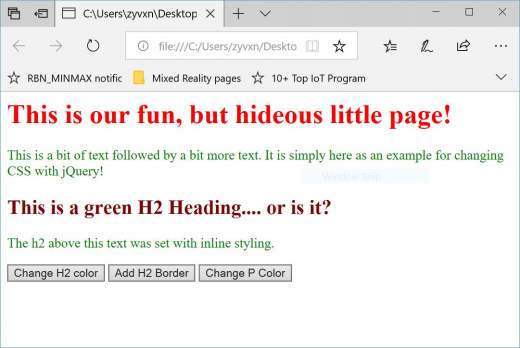
Figure 1: The sample page
As you can see in the figure, a page is presented that has a bit of goofy formatting. This includes coloring the text. Also included in the sample page are three buttons. The first two buttons make changes to the H2 tag’s CSS using jQuery. When the “Change H2 color” button is clicked, the change_h2() function is called, which contains the following call to css() within the h2 tag:
$('h2').css('color', 'blue');
If you compare this line of code to the earlier templates shown, then you can see that the selector is the h2 tag. This selector is listed to the left of the css() method. Within the H2 tag, the color property is being changed to the color blue. You can replace ‘color’ with any attribute of an H2 tag that you’d want to change, and you can replace ‘blue’ with the value you’d like that tag to be. The values need to be valid html attributes and settings.
The second button, “Add H2 Border” gives a second example that is similar to the first. Whereas the first button overwrote an existing attribute of the H2 tag, this second button is adding CSS. In this case, when you click the button, a green border that is 4 pixels wide will be added to the page as a result of the following code in the add_h2_border() method:
$('h2').css('border', "4px solid Green");
Figure 2 shows the page after the first two buttons have been clicked:

Figure 2: Changes to the H2 tag’s CSS values
In addition to adding and changing CSS values, you can also determine the value of CSS existing CSS. The third button presented in Listing 1 calls the method, change_p_color(), which includes the code:
function change_p_color ()
    {
       var pFontColor = $('p').css('color');

       if (pFontColor == "orange")
       {
          $('p').css('color', "black");
       }
       else
       {
          $('p').css('color', "orange");
       }
    }
I this method, the value of the P tag’s color attribute is read by calling the css() method on the P tag and passing the attribute you want to read:
$('p').css('color');
You could replace ‘p’ with any other valid HTML tag and change ‘color’ to any other valid attribute on that tag to read their values.
The change_p_color() method reads the color of the P tag and then uses that information to toggle the color of P tag each time the “Change P Color” button is clicked. If you click the button over and over, you’ll see that the color switches from back to orange, back to black, and so on.
In Conclusion
This article showed that CSS can be changed on a web page using JScript and a single line of code. Not only can you update and add CSS markup, but you also can add new CSS to a page.